New! WhatsApp Chat on Google Business Profile — Here’s How to Set It Up
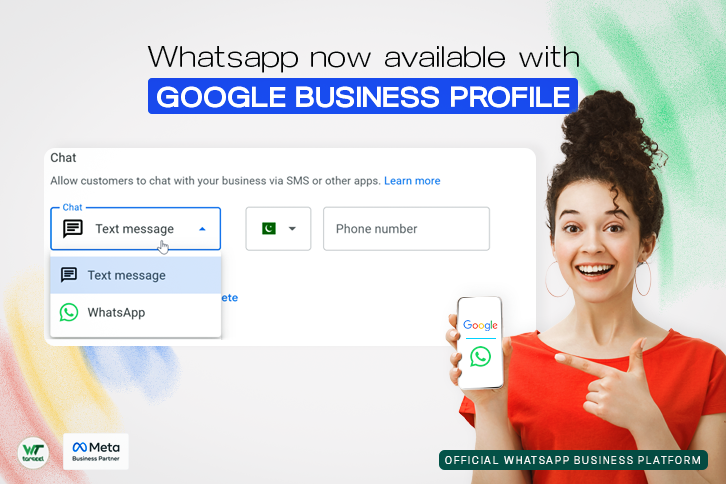
Most of us prefer texting over calling, especially when we just need quick info from a business. That’s exactly why the new WhatsApp chat on Google Business Profile is a game-changer.
Google Business Profile now lets you add your WhatsApp number so customers can reach out to you directly. No switching apps, no waiting on hold.
Sounds good? Let’s break it down.
What’s New with WhatsApp Chat on Google Business Profile?
If you have a Google Business Profile (formerly Google My Business), you can now link your WhatsApp Business number to it. This means:
- When someone finds your business on Google Search or Maps, they’ll see a WhatsApp button.
- With just one tap, they can message you directly — no need to dial or visit your website.
- You can reply instantly through the WhatsApp Business app — just like chatting with a friend.
In short, you’re now just a message away from your customers.
Why This Is Such a Big Deal
Here’s why this update matters, especially for small and local businesses:
👉 Faster conversations: People love WhatsApp. They’re already using it. Now they can reach you without friction.
👉 Build trust instantly: A business that replies quickly on WhatsApp feels more personal and reliable.
👉 Better lead generation: Every message is a potential sale. You’re meeting your customers where they already are.
👉 More control: You decide how to respond, when to respond, and what message templates to use.
This WhatsApp chat integration on Google Business Profile removes all communication barriers and puts your business one tap away.
Before You Start: What You’ll Need
Before enabling WhatsApp chat on your Google Business Profile, make sure these basics are in place.
- Make sure you’re using WhatsApp Business, not personal WhatsApp.
- Your number should already be verified and active.
- You must have access to your Google Business Profile.
Get these lined up, and you’ll avoid any frustrating hiccups later.
How to Add WhatsApp to Your Google Business Profile (Step-by-Step)
Setting up WhatsApp chat on Google Business Profile takes just a couple of minutes. Here’s how:
Step 1: Open Your Google Business Profile
- Head to Google Business Profile and sign in.
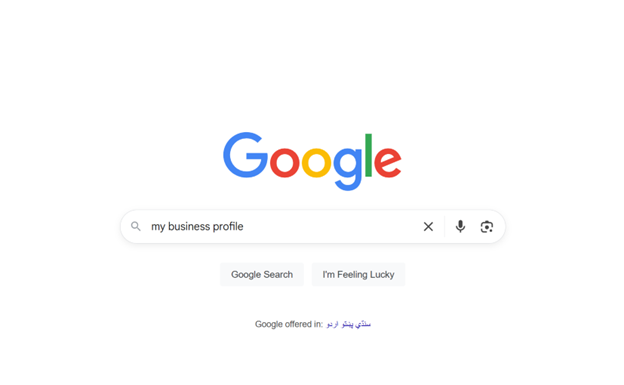
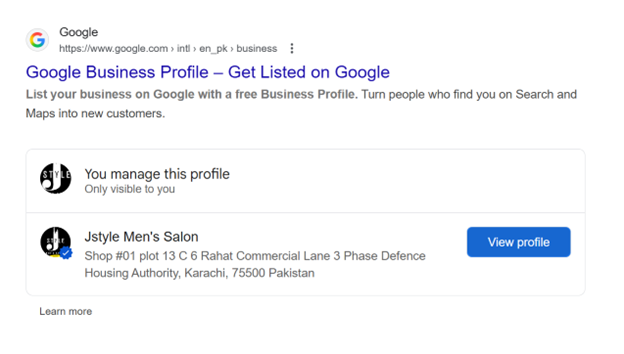
- Choose the business you want to edit.
Step 2: Go to the “Contact” Section
- Click “Edit profile”
- Tap on “Contact”
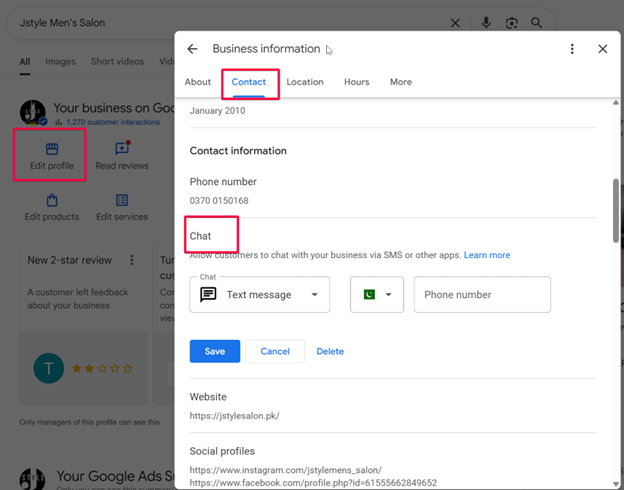
- Scroll to “Social profiles”
Step 3: Select WhatsApp
- Click “Add social profile”
- Choose WhatsApp
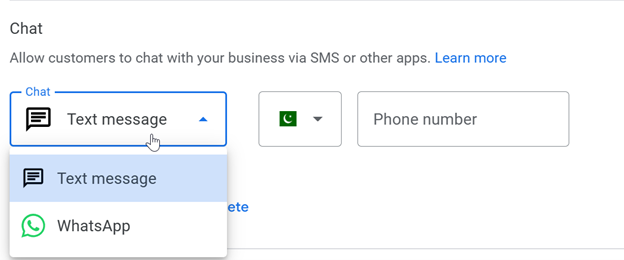
- Enter your WhatsApp Business number.
Make sure it’s a number you use for WhatsApp Business, not personal WhatsApp.
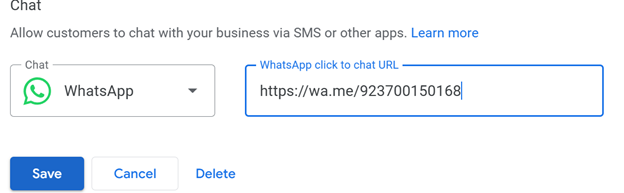
Step 4: Verify Your Number
- You’ll get a 6-digit code on WhatsApp.
- Enter that code to verify.
That’s it! Your customers will now see a “Chat on WhatsApp” button when they search for you.
How to get your WhatsApp chat link (wa.me)
Google's WhatsApp option asks for your number, as in the steps above. If you also need a link for your website, ads or social bios, use a WhatsApp click-to-chat link. It is https://wa.me/ followed by your full phone number in international format, with no plus sign, spaces or dashes.
Example: for +971 58 539 2490 the link is https://wa.me/971585392490. You can add a ready-made first message with ?text=, for example https://wa.me/971585392490?text=Hello. You can also use our WhatsApp link generator.
Google Business Profile WhatsApp: common questions
How do I add WhatsApp to my Google Business Profile?
Open your profile, choose Edit profile, go to Contact, add a social profile, select WhatsApp, enter your WhatsApp Business number and confirm it with the 6-digit code. The full steps are above.
Do I need WhatsApp Business?
Use the number of a WhatsApp Business account, not a personal one, and make sure it is verified and active before you start.
Can I reply to many chats at once?
Yes. A shared inbox on the official WhatsApp Business API lets several team members answer from the same number, with automated greetings and quick replies. See WhatsApp CRM software.
Tips to Make the Most of It
Once you’ve added WhatsApp, here are a few smart ways to use it:
✅ Set up auto-replies: Greet customers instantly, even outside business hours.
✅ Use quick replies: Save time answering FAQs with saved messages.
✅ Add your catalog: Let customers browse your products without leaving the chat.
✅ Stay responsive: Reply fast. Google even shows your typical response time.
Why This Changes the Game for Local Businesses
Running a local business isn’t just about great products or top-tier service. It’s about something even simpler; being reachable when people need you.
And let’s be honest, that’s where many small businesses fall short.
- Missed phone calls? Happens all the time — especially during busy hours.
- Emails? They get buried.
- Contact forms? Most customers don’t even bother anymore.
👉 The issue isn’t the service.
👉 It’s the friction in how customers try to reach you.
Now, imagine flipping that.
With WhatsApp chat on your Google Business Profile, all that hassle disappears.
- No waiting.
- No formalities.
- Just one tap, and the conversation begins.
This is a game-changer. Especially for small businesses that thrive on quick communication and a personal touch.
Supercharge It with Wetarseel
If you want to take it a step further, tools like Wetarseel can make this even more powerful.
By combining WhatsApp on your Google Business Profile with Wetarseel, you can:
✅ Automate greetings and replies
✅ Send pre-built responses to FAQs
✅ Track and manage leads in one place
✅ Respond faster — even outside working hours
The result? Faster replies, and more of your chats turned into customers.
https://wetarseel.ai/how-wetarseel-is-transforming-business-customer-interactions/
Getting more chats than you can answer? Wetarseel is a Meta Business Partner. Our team helps you move to the official WhatsApp Business API with a shared inbox, automated greetings and lead tracking.Start your free trialChat with us on WhatsApp
Final Thoughts: Don’t Just Get Found — Get Contacted
Adding WhatsApp chat to your Google Business Profile is more than a feature — it’s a faster, more personal way to connect.
Just a tap, and you’re in their pocket — literally.
Take 2 minutes to set it up.
Then let Wetarseel help you turn those chats into loyal customers — effortlessly.
👉 [Create your Wetarseel account and get started today.]
https://wetarseel.ai/how-to-create-a-wetarseel-account/?utm_source=chatgpt.com


Discussion
No comments yet